Use this when you want AI Chatter to start replying for one selected creator. AI settings are configured per creator, so first select the creator you want to update.
Open AI Chatter for the selected creator and review the setup messages shown in AI Core Settings. Resolve any blocker before choosing an active mode.
Reconnect the creator if the account is disconnected.
Complete the creator information if required fields are missing.
Add funds if the account balance blocks AI.
Create or fix a qualifying AI script with templates, following the on-screen price requirement.
Ask an owner or administrator for help if the page is read-only for you.
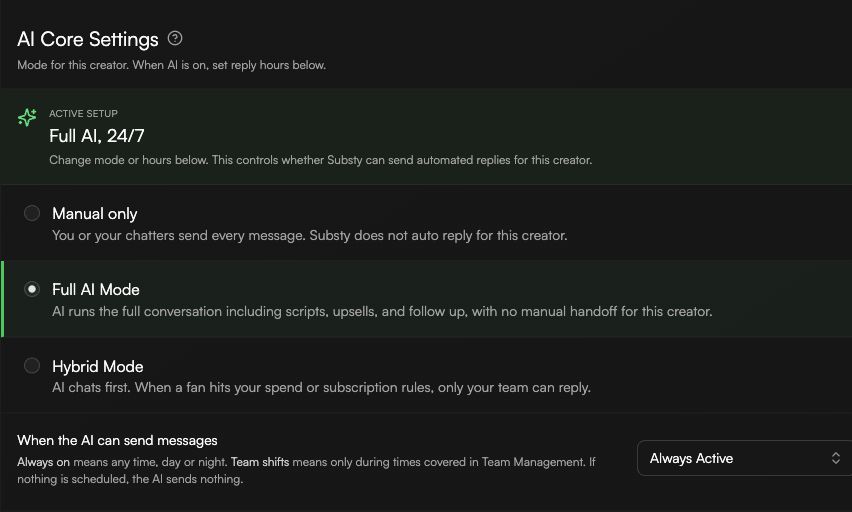
Manual only: Substy does not send automated replies for this creator.
Full AI Mode: AI runs the conversation, scripts, upsells, and follow-up without a manual handoff for this creator.
Hybrid Mode: AI chats first, then hands the fan to your team when the configured spend or subscription rules are met. Hybrid Mode requires Elite.
Use When the AI can send messages to choose the reply window. Always Active lets AI reply any time. Team Shifts limits replies to covered periods in Team Management. If no shift is scheduled, AI sends nothing during that time.
After saving, review Active setup. It shows whether the selected creator is Manual only, Full AI, or Hybrid, and whether replies are always active or scheduled.
