Start with the affected creator, then check the affected conversation. Most reply issues come from a disabled mode, a visible setup blocker, reply hours, or the fan-level AI status.
Open AI Chatter for the affected creator and check AI Core Settings. If Active setup says Manual only, AI is off for that creator.
Resolve every visible setup blocker. The page may ask you to reconnect the creator, complete creator information, add funds, or create a qualifying AI script with templates.
For script requirements, follow the exact on-screen minimum shown for that creator.
Check When the AI can send messages. If Team Shifts is selected and no shift covers the current time, AI sends nothing.
If the issue affects one fan, open the conversation and check the AI status in the header. AI disabled means the fan is not currently handled by AI. AI needs scripts to talk means there are no available scripts for that fan.
If the fan is a verified creator account, review Allow Verified Creators in Behavior Settings.
If the issue continues, contact Substy support from the in-app help bubble and include the visible symptom, creator display name, approximate time, and what you checked.
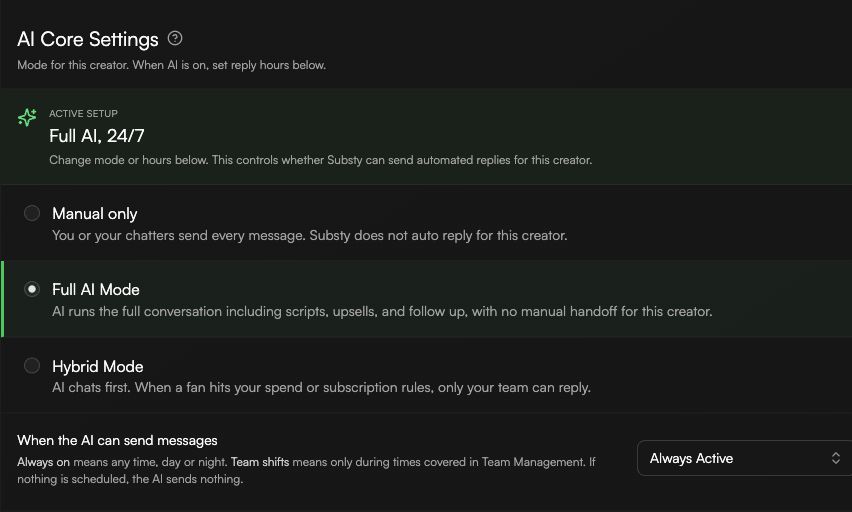
Do not switch modes, change reply hours, or create new scripts for every creator unless you confirmed the affected creator is the one with the problem. AI settings are creator-specific.
