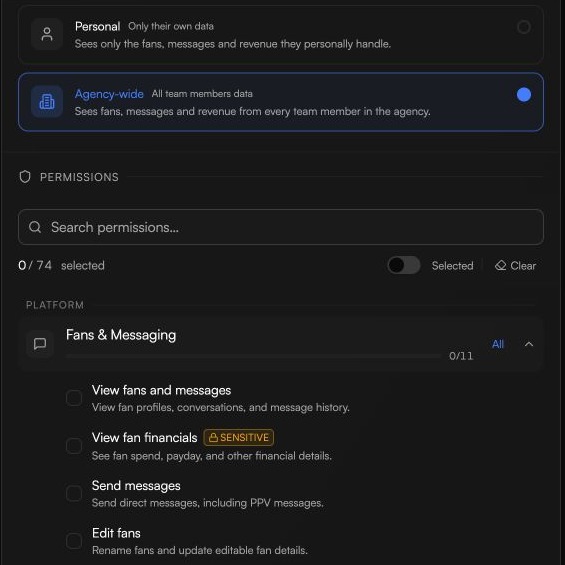
A role is two things stuck together: a list of permissions (what the person can do) and a data visibility setting (how much data they can see). This article explains both so you can build roles that fit your team.
A permission is a single capability. Each one has a short key like fan:view, media:manage, or payout:request. A role is simply a set of these keys turned on.
Permissions are grouped into two blocks in the role editor so they're easy to scan:
Platform — day-to-day work on the connected OnlyFans/Fanvue account: fans, messaging, queue, mass messages, content, vault, scripts, templates, platform accounts.
Dashboard — everything around the platform: analytics, automations, segments, tracking links, inboxes, AI configuration, team management, schedules, notifications, billing and payouts, agency settings, and the embedded browser.
Every permission has a risk tier, shown with a label in the role editor so you know what you're turning on:
Normal — everyday actions. Viewing fans, sending messages, viewing the queue, viewing the schedule.
Sensitive — actions that affect money, fan perception, or AI behaviour. Viewing fan financials, unsending messages, managing promotions, editing AI prompts, exporting analytics to CSV, linking AI schedules.
Danger — destructive or high-risk actions. Managing billing, topping up the wallet, requesting payouts, managing roles, and using the embedded browser. Grant these only to people you trust with real money and real account access.
Tiers don't change what the permission does — they just help you understand the impact before you grant it.
Some permissions imply others. If you grant media:manage, the person automatically gets media:view as well — you can't manage the vault without being able to see it.
A few common pairs:
media:manage → media:view
script:manage → script:view
template:manage → template:view
queue:manage → queue:view
schedule:manage → schedule:view
automation:manage → automation:view
content:manage → content:view
segment:manage → segment:view
tracking:manage → tracking:view
mass_message:manage → mass_message:view
billing:manage → billing:view
team_members:manage, team_members:remove, team_members:assign_role → team_members:view
team_invitations:manage → team_invitations:view
team_roles:manage → team_roles:view
You don't have to tick both — the system adds the implied permission for you.
Permissions decide what someone can do. Data visibility decides whose data they can do it to.
SELF — the person only sees data tied to them personally. Their assigned fans, their own shift stats, their own inbox. Everyone else on the team is invisible to them.
ALL — the person sees data across the agency, scoped only by which creators they're assigned to. Good for team leaders, admins, analysts, and anyone who needs the full picture.
Data visibility and permissions work together. For example:
analytics:view_employee_performance + SELF → a chatter sees their own performance but no one else's.
analytics:view_employee_performance + ALL → a team leader sees the whole team's performance.
fan:view + SELF → the user only sees the fans assigned to them.
fan:view + ALL → the user sees every fan across every creator they have access to.
A chatter with permissions to view everything but SELF visibility is still a chatter in practice — they'll only ever see their own corner of the agency. That's why SELF is the right default for most junior roles.
The fastest way to build a new role is to duplicate Chatter or Team Leader and adjust from there. See Creating and assigning custom roles for the step-by-step.