Hybrid Mode lets AI Chatter handle a conversation until the selected creator's spending or subscription rules call for a human handoff.
Hybrid Mode requires the Elite plan and permission to edit AI settings for the selected creator.
Complete the required Creator Information, make sure funds are available, and have an eligible AI script.
At least one Spending Threshold or Subscription Duration rule is required. Subscription Type by itself cannot activate Hybrid Mode.
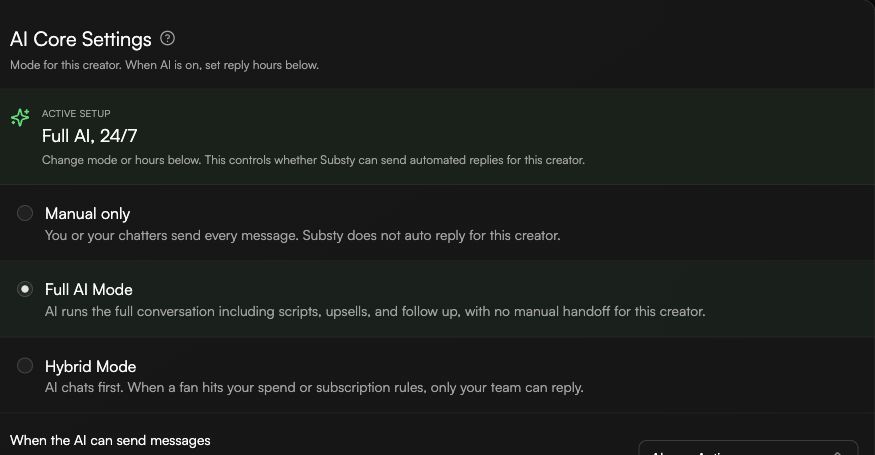
Open AI Chatter, choose General, and find AI Core Settings.
Choose Hybrid Mode. If it is already active, choose Handoff rules to reopen the configuration.
Enable Spending Threshold, Subscription Duration, or both. Choose Less than, Exactly, or More than and enter the value for each enabled rule.
For Subscription Duration, choose Days, Months, or Years. The minimum is 3 days, 1 month, or 1 year.
For an OnlyFans creator, optionally refine the rules with Subscription Type. Choose Free, Paid, or both; choosing both applies no subscription-type restriction.
If both thresholds are enabled, choose how they work together: AND stops AI as soon as either threshold is exceeded; OR stops AI only when both thresholds are exceeded.
Choose Save & Activate. A successful setup shows Hybrid enabled.
When a rule stops AI for a fan, AI is paused for that fan.
Open Messages and use the Handoff filter to find conversations waiting for a human.
A chatter reply resolves the pending handoff. It does not re-enable AI for that fan; re-enable AI separately when you want it to reply again.
Couldn't enable Hybrid: confirm that at least one threshold is enabled, then check the Elite plan, AI-settings permission, Creator Information, funds, and eligible script requirements.
Subscription Type is missing: this refinement is available only for OnlyFans creators.
The handoff cleared after a chatter replied, but AI is still paused: re-enable AI for the fan separately.
